


Iran 'successfully' launches satellite but fails to put it into orbit
Iran said it "successfully" launched a satellite Sunday but failed to put it into orbit.
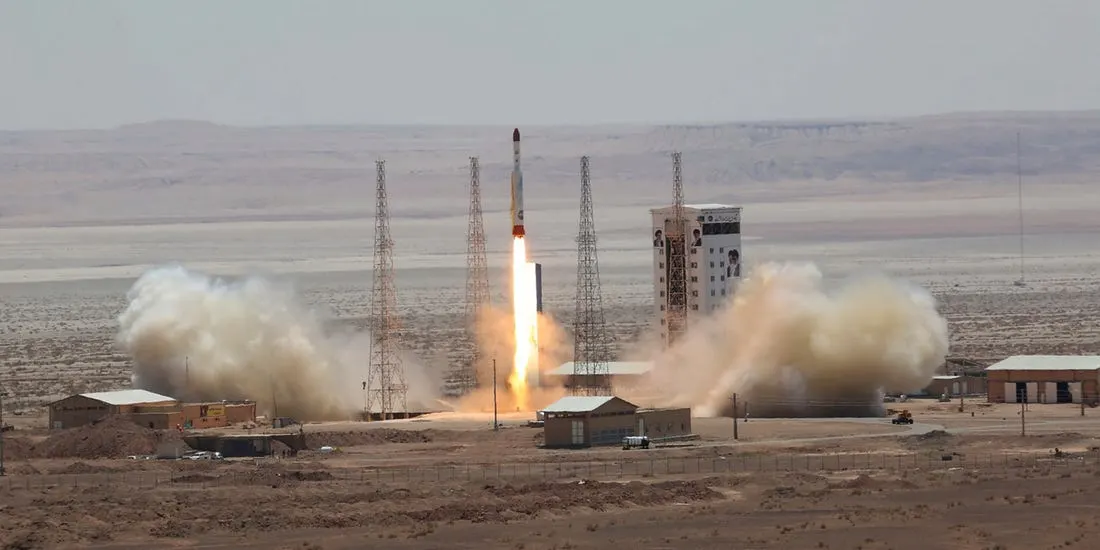
Iran said it "successfully" launched a satellite Sunday but failed to put it into orbit.
On Sunday, it launched the Zafar satellite at 7:15 pm (1545 GMT) but it fell short of reaching orbit, the defence ministry said.
A ministry spokesman said initially that the satellite was "successfully" launched and went "90 percent of the way", reaching an altitude of 540 kilometres (335 miles).
"The Simorgh (rocket) successfully propelled the Zafar satellite into space," said Ahmad Hosseini of the ministry's space unit.
"Unfortunately, in the final moments the carrier did not reach the required speed" to put it into orbit, he told state television.
"God willing with improvements made in future launches this part of the mission will be done as well," he added.
"We achieved most of the goals we had and data has been acquired, and in the near future, by analysing the data, we will take the next steps."
Telecommunications Minister Mohammad Javad Azari Jahromi admitted in an English-language tweet soon after that the launch had "failed".
"But We're UNSTOPPABLE! We have more Upcoming Great Iranian Satellites!" said Jahromi.
 افزودن تابناک به منابع ترجیحی گوگل
تابناک را در شبکه های اجتماعی دنبال کنید
نظرات بینندگان
هنوز دیدگاهی منتشر نشده است.
دیدگاه خود را بنویسید
سایت تابناک از انتشار نظرات حاوی توهین و افترا و نوشته شده با حروف لاتین (فینگیلیش) معذور است.